Hello everyone!
Emps-World is coming to mobile phones! The apps are still in testing phase but are fully playable already. Moreover, the homepage has been overhauled with a modern style, reworked logo and new brand icon. Head over to
https://emps-world.net/play to check out the android / iOS client.
Mobile AppsYou can now download and test our beta mobile app for iOS and android. Head over to:
https://emps-world.net/play for the download links. In order to properly support touch events, many in-game interfaces and menus have been enlarged. You will find the minimap on the left as well - that creates more space for your inventory on the right. Have a look at what it looks like:
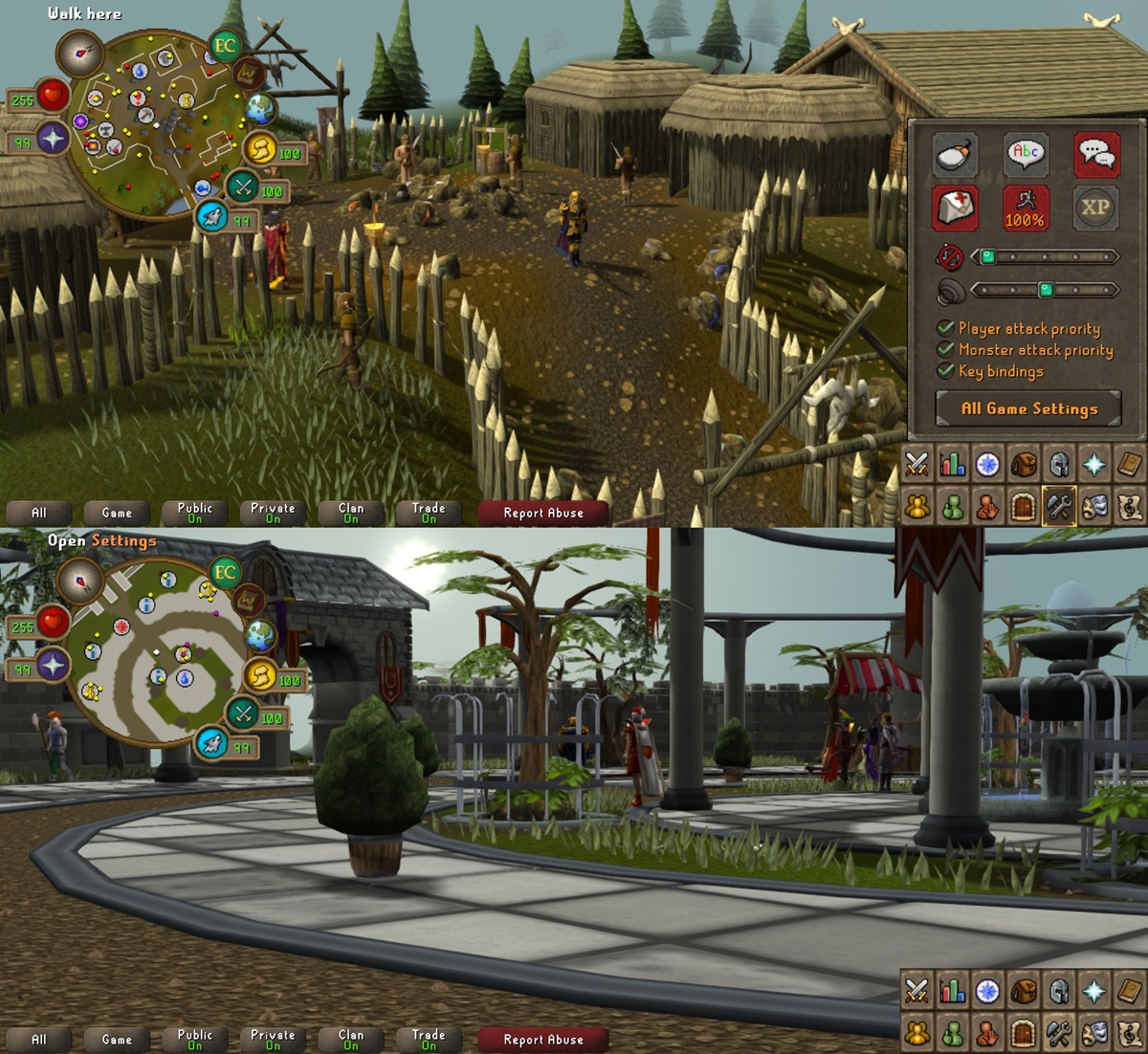
Have fun playing on your phone! If you are running into issues or want to give feedback feel free to post in the
Helpdesk or head over to
Discord!
Mobile clients start in low to medium graphic settings with limited render distance and capped fps. You are free to change those settings but bear in mind your phone can become hot when it has more calculations to do. You can run any graphical improvements that the desktop client has too: Shadows, water reflections, lighting, etc.
Almost all settings from the apps can also be toggled in the desktop client when using the Mobile Renderer. At the moment we support three different rendering engines: Legacy Renderer, OpenGL Renderer and Mobile Renderer. You can switch between them from the desktop client's launcher settings - bottom right icon. Later this year the support for Legacy Renderer and OpenGL Renderer will be dropped. You've been switched to the modern Mobile Renderer automatically with this patch. That's an optimized client which runs faster and smoother on all platforms. You can read more about that in the Render Engine Rewrite section below.
Branding & HomepageWith the upcoming release of mobile apps the homepage needed a bit of a rework. It should be easier to use and not fill half your screen with a huge logo. Inspiration was taken from other gaming sites which all have a top navigation bar with their logo. Smaller sections including preview videos / images and news posts follow. That gives first time visitors a smoother experience to find what they need - see the game, register an account & download the game. I've also updated logos and icons. You'll see the new seasonal logos throughout the year. These images have been created and enhanced by AI.
I've also added some of the new homepage styles to the Mobile Renderer. The login screen has been modernized & the game can remember up to 5 logins. You no longer need to enter your password on every login.
Render Engine RewriteIn order to properly support mobile devices I've completely rewritten the render engine from its core. This is a rather technical section - feel free to skip this if you aren't interested. Sooo you've been warned!
The game client now uses a library called
libgx. That allows me to use the same core code for different devices. Android and iOS specific code is less than 1% of the entire code base. Libgdx is written in Java, the language emps is written in! So the work for creating mobile clients transformed from rewriting everything into using libgdx. That was still roughly 3 months of work compared to an estimate of at least 1 year of work for creating completely new and native apps.
The initial mobile renderer performance was too poor to smoothly run on phones. Especially the original animation system was way too slow. In order to solve that, the game pre-renders animation frames and stores them on your graphics unit. That calculation can be off-loaded from the render section and ensures your fps don't dip much. With this change the game became a lot smoother and caused way less fps drops when new animations loaded in. And that made the mobile client fast enough to run 60 fps on modern phones!
The objective of the Mobile Renderer is to keep your fps stable and prevent hefty fps drops. Mobile phones don't have cooling fans nor high CPU clocks. So I had to ensure loading happens in parallel and smoothly over time rather than immediately. You'll find that these improvements work quite well on your computers as well. On some slower laptops I could see fps increases of up to 30% without fps drops when rendering lots of animations. Performance on high-end machines is slightly better. The biggest visual improvement is rendering smooth animations everywhere instead of scaling them down for distant models.
On top of the new mobile renderer, all config and asset files have been transformed. The new assets can be read directly by the game engine and no longer need to be decoded. That means that all loading times including map, start up, models, textures, etc. have been significantly reduced. The only downside is that the game files have roughly tripled in size. All data that was previously calculated during runtime is now calculated once and stored in the files. This sounds a lot worse than it actually is though... the game files went from about 200MB to roughly 600MB. That is no problem for any computer or mobile phone. The new asset system also has support for higher quality audio and textures - that's going to be a future update though.
Changelog:- Skeletal horror can now be killed for the Skeleton slayer task.
- The EP shop prices for Darkbows have been fixed.
- Mystery box now correctly fills up your collection log.
- You can now continue dialogues without your active interface closing. This fixes a problem where a dialogue would block checking item prices in shops.
- Dagon'hai robes no longer require level 42 Slayer to be worn.
- The event tickets you receive from mail are now correctly added with a x10 modifier.
- Jade bolt tips no longer sell for 0 coins.
- Shop interfaces now have a Buy/Sell All and Buy/Sell Last Amount option.
- Taking and placing Grand Exchange items is now logged. We were already logging transactions but not when you take or place items. Over the past weeks a few people reported that their transactions went missing. With these logs we can find out what happens and also just return items when something goes wrong.
- It is no longer possible for ironmen to sell any items on the Grand Exchange.
- Staff members can now mail and trade Event tickets with any player.
- The friend list requirement for staff members to send in-game mails has been disabled.
- Items can now be dragged between inventory and bank interface. If you find this feature useful I'll also add id to the rest of interfaces. By default a drag operation moves an entire item stack or a single item if it cannot be stacked. Bank placeholders and existing items in your bank are preserved.
- PvP kill counts now reset 20 seconds after player combat rather than 7-10 seconds.
- Player / monster attack priority options now prioritize your last attacked target above others.
- PvP combat now shares under attack timers. Once a fight starts you can no longer interrupt it with another account.
- Some EC packages have been adjusted. You get more bonus EC for the 80€ and 35€ package now.
So what's next? The app project started with an experiment back in late November to see if it was technically possible. That turned out to the push for mobile clients and also to modernize the online presence. Including the homepage, logos, icons, etc. In the coming days, hopefully not weeks, I will monitor android / iOS apps and improve them where necessary. After that I want to announce an official release and place ads to regain old players but also attract new ones. I'm sure mobile apps will be a good selling point... :D
All the best,
Thomy